


BabyCam - Baby Monitor Camera
4.5644.00 Reviews
App Specs
- Version
- 2.49
- Updated On
- License
- Free
- Downloads
- 1,000,000+
- Developer
- ArjonaSoftware
- Categories
- Parenting
- Platform
- Android, iOS
Screenshots
 Analysis by AppCompare
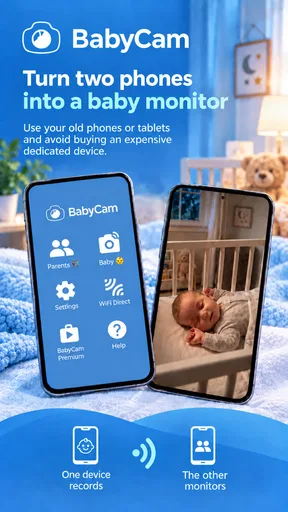
I see a clear use for BabyCam - Baby Monitor Camera: it can turn devices you already own into a way to check on your baby without buying a dedicated monitor first. That is appealing when you want a simple setup for naps or bedtime, although I would treat a phone-based monitor as a practical aid rather than a replacement for attentive care. The app is free to download, and its basic idea is easy to understand: use one device near the baby and another where you want to keep watch.
What the free option is worth
There is no upfront price to try it, which makes the first step low-risk if you have two suitable devices at home. The app is made by ArjonaSoftware, is rated for Everyone, and has an average rating of 4.4 from around 30,000 ratings. It has passed a million installs, so it is not an obscure experiment, though popularity alone cannot tell you whether it will suit your room, devices, or routine.
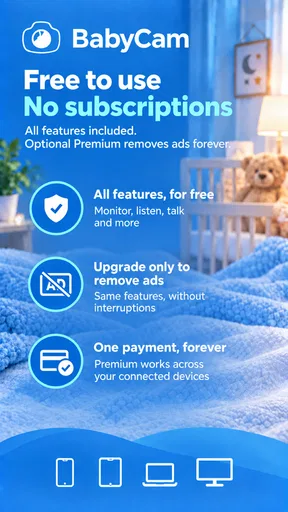
There are in-app purchases listed at $3.49 per item. I would separate that from the free entry point: you can consider the app without paying, but should check the purchase details in the app before deciding whether any paid option is worthwhile for you. I would not assume that every feature is included free, or that a purchase is necessary to use the core monitoring idea. The useful question is whether the free experience covers your particular routine before spending anything.
Where the value comes from
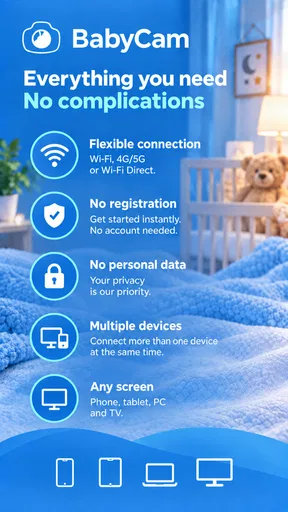
The strongest value is reusing an older phone or tablet instead of buying another piece of equipment. That can be especially handy for a family trying a monitor temporarily, a grandparent helping with an afternoon nap, or a parent who wants a second viewing point in another room. Since the app can be used with a mobile phone, tablet, PC, or TV as part of the monitoring setup, it can fit more naturally into a home than a monitor with only one dedicated screen.
That flexibility matters more than a long feature checklist. A spare tablet can stay in a shared living area while your phone remains with you, for example. Before relying on that arrangement, I would test the connection, sound, and screen behavior in the exact rooms you plan to use. A setup that works well across the house is more valuable than one that looks convenient in theory but needs repeated fiddling at bedtime.
Using it as part of a real routine
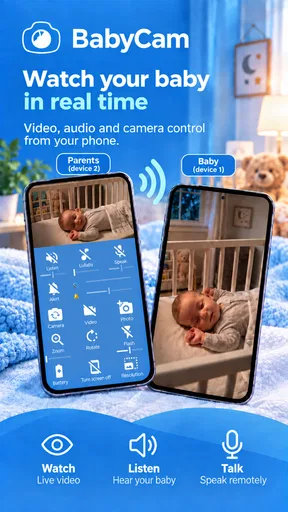
For a realistic evening, I would place the camera device where it has a stable view of the sleeping area, start the monitoring session, and take the viewing device to the room where I will be folding laundry or settling down. I would check the picture and audio before walking away, then keep the viewing device accessible rather than leaving it across the room. That small habit makes it easier to notice whether the setup is still working instead of assuming it will stay connected indefinitely.
Setup decisions that save hassle
Using two devices sounds straightforward, but it helps to decide in advance which one will stay with the baby and which one you will carry. If you use a phone as the camera, you may not want to tie up the phone you normally need for calls and messages. A spare tablet can be a better camera device because it can remain in place, while your everyday phone stays available as the monitor. The reverse may make sense if the tablet is the screen you prefer to keep nearby.
Worth Reading Before You Choose

Switching to Android Auto Means Rethinking Your Driving Routine

Google Calendar Makes a Crowded Week Easier to Manage

Baby Panda World Brings Quick Play to Modern Phones, but Its Game Library Feels Busy

ESPN’s Live Game View Makes Following Close Games Easier

QuizzLand Review: A Good Fit for Short Trivia Breaks, Not Every Player

Basketball Stars: Multiplayer Is Fast, but Can It Recover When Matches Go Wrong?
I would also do a short trial while the baby is awake or when another adult is present. That lets you adjust the camera position, learn how the controls behave, and confirm that the sound reaches the viewing device at a useful level. Don’t wait until a tired late-night moment to discover that a device is muted, pointed at the wrong area, or inconveniently placed. This is a small preparation step, but it can prevent a lot of frustration.
One practical trade-off is that the monitoring setup occupies both devices for as long as you use them. That is easy to overlook if one is your main phone or if the household has only a couple of spare screens. Think through charging and placement too: a device left running as a camera needs a stable, safe place, with cables kept away from the baby. I would never balance a phone precariously on furniture just to get a better angle.
What it does—and does not replace
Compared with a conventional dedicated baby monitor, an app-based approach is attractive when you already have compatible devices and want to avoid buying another screen. The familiar phone interface may also be easier to share with another caregiver than a monitor that lives in one fixed spot. The trade-off is that the experience depends on the devices you supply and how well they work together; a purpose-built monitor may be the better choice if you want a ready-to-use system that stays set up for this one job.
It is also different from simply checking a room in person. A camera view can help you keep an eye on the sleeping space while you do something nearby, but it cannot respond for you or guarantee that you will notice every change. I see it as a convenience for ordinary household moments, not as permission to leave a baby unattended or to rely on a screen instead of safe sleep practices and direct care.
If your main need is monitoring from far away, make sure you understand how the connection works in the places you intend to use it. The app’s summary describes monitoring through multiple kinds of devices, but a home setup and a remote-away-from-home setup are not the same thing. I would test your intended arrangement rather than assume that a feature that works within your home will behave identically over a different network.
Sound, picture, and the limits of a screen
A useful monitor is not just about seeing an image; it has to be easy to interpret while you are doing something else. I recommend choosing a camera position that gives you a clear view of the relevant sleeping area without placing the device where it could fall or become reachable. A wider view can be convenient, but no camera angle gives a complete picture of a baby’s wellbeing. The right expectation is that it helps you check in, not that it makes supervision automatic.
Before using any app as a regular part of bedtime, I would test what happens when the viewing device is locked, its screen dims, or you move between rooms. Those ordinary phone behaviors can affect how comfortable a monitoring routine feels. If the device’s alerts, display, or audio are not dependable enough for your needs, a dedicated monitor with controls designed specifically for that task may be a more reassuring option.
Privacy is another reason to be deliberate about placement and access. Keep the camera device in the baby’s room only when you intend to monitor, and make sure other people in the household know when it is in use. I would also review the app’s current settings and permissions on the device rather than making broad assumptions about how any camera app handles information. For a family that is uncomfortable using a phone camera indoors, a standalone monitor may simply feel like the better fit.
Who is most likely to get value
I think this is most useful for parents who already have a spare Android phone or tablet, want a low-cost way to try room monitoring, and are comfortable managing a two-device setup. It can also suit caregivers who want a flexible screen arrangement at home rather than another dedicated gadget. The app’s current version is 2.44, and it supports Android 4.4 or later, which may help households considering an older spare Android device; compatibility still depends on the device itself and its current software.
On the other hand, I would skip this approach if you have only one phone available, need a monitor that is always ready without tying up a personal device, or would rather avoid configuring technology around sleep routines. A dedicated monitor is likely more suitable if you value a purpose-built camera and viewer above reusing hardware. And if you need professional medical monitoring, a general parenting app is not a substitute for equipment and guidance recommended by a healthcare professional.
Parents often ask whether they need Wi-Fi, whether the app works across device types, and whether it is free. The best answer is to distinguish the broad setup from your particular home: the app is intended to let you monitor using different device types, it is free to download, and there are paid in-app items. I would verify the connection and compatibility with your own devices before depending on it, especially if you plan to mix platforms or use it outside the home.
A sensible way to judge the paid value
Because there are in-app purchases, I would first use the free access to see whether the basic arrangement fits your needs, then consider a paid item only if its described benefit solves a real problem for your household. The listed price is $3.49 per item, but that alone does not tell you which purchase is useful or whether you need one. Avoid paying on the assumption that a purchase will fix a device, network, or placement issue; those are better checked directly in a test session.
This makes the value decision fairly personal. If the app lets you reuse a spare device for a routine you already have, even a modest purchase may be worth considering if it adds something you genuinely want. If you are only curious, or still deciding whether phone-based monitoring is comfortable, the free starting point is the sensible place to begin. I would not pay simply because the app has optional purchases.
Easy Setup and Intuitive Interface
Setting up BabyCam - Baby Monitor Camera is as easy as pie. You don't need to be a tech wizard to get started. Just download the app on two devices—one as the camera and the other as the monitor. Voila! You're ready to go. The interface is super intuitive, so even if you're running on minimal sleep, you can navigate it without a hitch. The app supports both Android and iOS, which means you can mix and match devices to your heart’s content.
Features that Make a Difference
Now, let’s talk features because, honestly, that's what makes this app stand out. First off, the live video feed is crystal clear, even in low light. I was amazed at how clearly I could see my little one snoozing, thanks to the night vision mode. It’s like having a night-vision camera without the hefty price tag.
Another cool feature is the two-way audio. Ever wanted to soothe your baby without getting out of bed? You can talk to your baby through the app, which is a lifesaver during those late-night wake-ups. Plus, you can play lullabies directly from the app to help them drift back to sleep.
Security and Peace of Mind
One of my biggest concerns with baby monitor apps is security. With BabyCam, everything is securely encrypted, so you don’t have to worry about anyone else tuning into your video feed. It's like having your own private channel. Plus, the app doesn’t require an internet connection, so you can use it anywhere, even if your Wi-Fi decides to take a break.
Battery and Data Usage
Worried about power consumption? The app is designed to be energy-efficient, so it won’t drain your battery life faster than your little one can drain a bottle. Data usage is also minimal, especially since it doesn’t rely on an internet connection. This makes it perfect for those times when you’re out and about and don’t want to blow through your data plan.
Why It Stands Out
Now, you might be wondering, with so many baby monitor apps out there, why choose this one? For starters, it’s incredibly user-friendly. The app’s developers clearly understand that parents don’t have time to fiddle with complicated settings. Everything is straightforward and designed to provide peace of mind. The quality of the video and audio is top-notch, and the extra features like lullabies and two-way audio are just the cherry on top.
Additionally, the flexibility of using any two devices means you can repurpose your old smartphone or tablet, turning them into a high-quality baby monitor without spending a dime on new equipment. That’s a win for both your baby and your wallet.
Final Thoughts
All in all, BabyCam - Baby Monitor Camera is a fantastic app that does exactly what it promises. It provides parents with a reliable way to keep an eye on their little ones without the hassle of traditional baby monitors. Whether you’re a tech-savvy parent or someone who just wants something simple and effective, this app ticks all the boxes.
So, if you’re in the market for a baby monitor app that combines ease of use with top-notch features, give BabyCam a try. Trust me, once you’ve experienced the convenience it offers, you’ll wonder how you ever managed without it!
Pros
- User-friendly interface for easy setup.
- Two-way audio for real-time communication.
- High-quality video streaming capability.
- Motion detection alerts for security.
- Works over Wi-Fi and mobile networks.
Cons
- Requires stable internet for best performance.
- Limited features in free version.
- Battery consumption can be high.
- Some features need in-app purchases.
- Occasional connectivity issues reported.
FAQs for BabyCam - Baby Monitor Camera
What features does BabyCam - Baby Monitor Camera offer?
BabyCam provides a range of features designed to ensure peace of mind for parents. It includes live video streaming, two-way audio communication, and night vision for monitoring in low light. Additionally, it offers motion and sound alerts, allowing you to receive notifications if your baby moves or makes noise.
Is BabyCam compatible with both Android and iOS devices?
Yes, BabyCam is available for both Android and iOS platforms. This ensures that you can use the app on a wide range of devices, including smartphones and tablets, providing flexibility and convenience for monitoring your baby from anywhere within your home.
How secure is the BabyCam app in terms of privacy?
BabyCam prioritizes user privacy and employs encryption to protect your video and audio streams. This means that only you and authorized users can access the monitoring feed. It's also important to regularly update the app to benefit from the latest security enhancements.
What are the system requirements for running BabyCam?
To use BabyCam effectively, ensure your device is running a compatible operating system version: Android 5.0 or later, or iOS 11.0 or later. Additionally, a stable Wi-Fi connection is crucial for seamless video streaming and communication between your monitoring devices.
Does BabyCam offer customer support if I encounter issues?
Yes, BabyCam provides customer support to assist with any technical issues or inquiries. You can access support through the app itself or via the official website. They offer FAQs, troubleshooting guides, and direct contact options to ensure you receive the help you need.


